
Meeting/Application Chair
As in regular review meetings, the Chair serves as the moderator of the discussion of scientific and technical merit of the applications being reviewed. The chair is also a peer reviewer for the meeting.
In cases where the Meeting Chair has a conflict on a particular application, another reviewer can be assigned as the "Application Chair". This task is performed in the Virtual Meeting List of All Applications screen (selected from the Go To: menu).
In order to change the chairperson for an application, select the Virtual Meeting List of All Applications screenfrom the Go To: menu.
Next, go to the  three-dot ellipsis icon for the application in question. From the three-dot ellipsis icon, select the Assign Application Chair option.
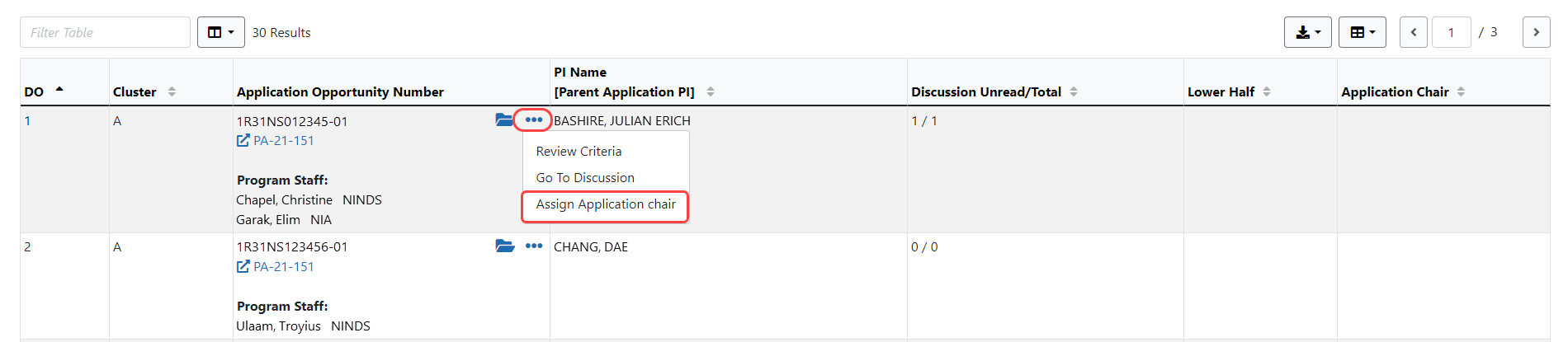
Click on the Assign button to bring up a window to select from available reviewers. (click to view assignment window)
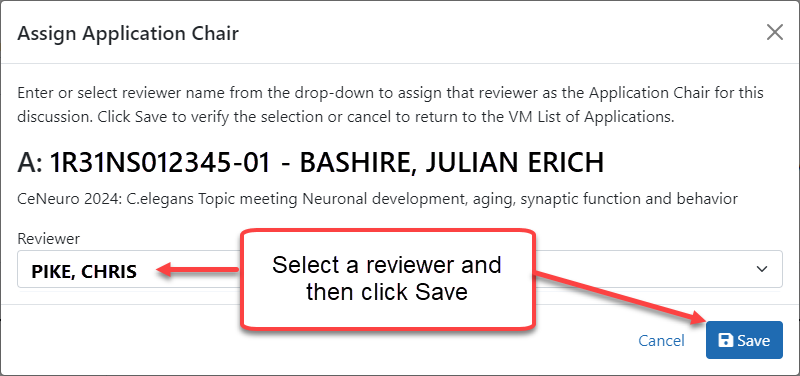
Once the selection is saved, the chairperson's name will appear for that application in the Application Chair column.

To remove the chairperson, click the 'X' next to the person's name.
