
Search Accounts
Click Account Management (Admin) to open the AMM Search Account screen.
The Search Accounts screen for external users provides the ability to search for existing Commons and system accounts and/or profiles.
Search Accounts
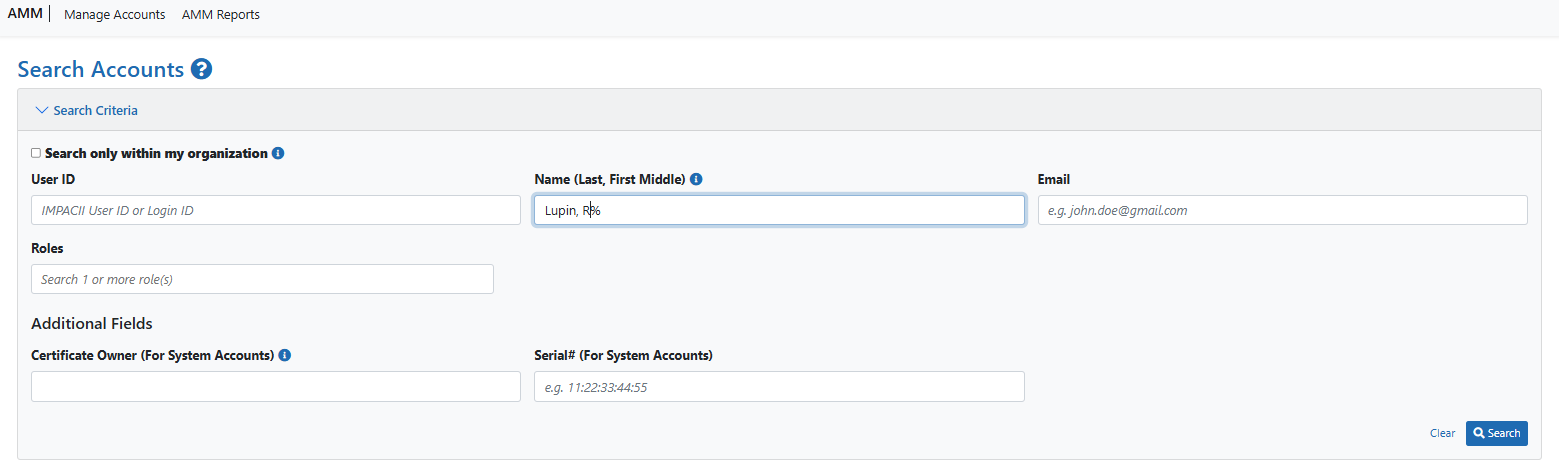
Search Accounts screen for Commons users
Enter the appropriate search criteria in at least one of the search fields:
Note: Wildcard characters such as the percentage sign (%) can be used to search for a string of characters.
Search only within my organization - this is a checkbox with a tooltip explaining how it works: "Please check the checkbox to search for profiles having accounts within your organization."
User ID - this field is used to search the IMPAC II database user ID and login ID name. The format for the name field is "last name, first name middle name" with a tooltip explaining the format: "Enter full name in Last, First Middle Name format. e.g., Doe, John H or Doe, John or Doe, John Henry."
Email - this is a text field.
Roles - this is a typeahead text field that only displays the roles that the user has the privilege to search for and view. One or more roles can be selected.
There are additional search fields related to different account types that are useful if you're searching for a particular account:
Certificate Owner (for System Accounts) - Search for users by the organization that is the systems account's certificate owner.
Serial# (For System Accounts) - Text-only field with mask (e.g., 11:22:33:44:55)
Click the Search button to execute the search or click Clear to clear the search criteria.
For more information, see Commons User Account Search Results.
Search by Role
To search by role, click the typeahead text field and available roles display in a dropdown or start typing the role name and matching role names will show up. You can select multiple roles from the Roles dropdown.
NOTE: When you search by roles, you can only search within your organization. You can select multiple roles, but the default search is for all roles appropriate to your account role. The Search only within my organization checkbox will be checked by default.
