
Principal Investigators (PIs) and users with the ASST (PI Assistant) role who have been given the xTrain delegation by the PI, and are affiliated with the RTD organization, have the ability to update or unfinalize the RTD for a training grant.
To update or unfinalize an RTD:
-
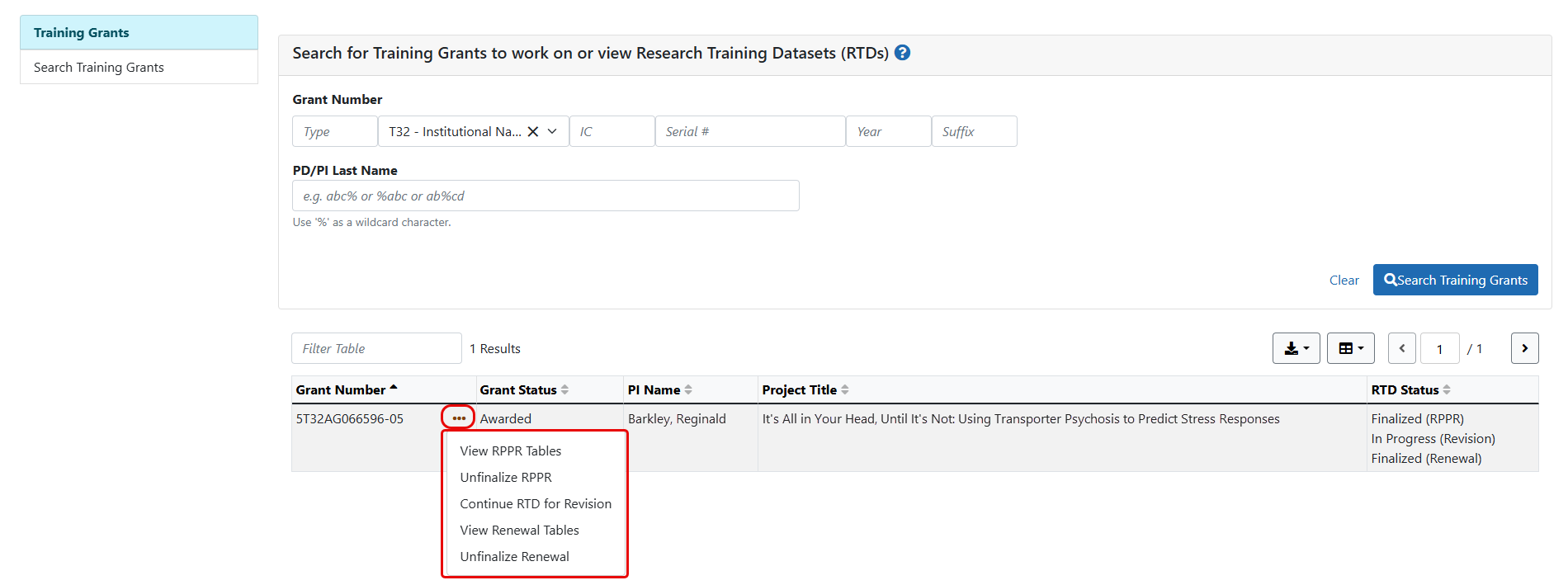
Search for the training grant using the search criteria fields.
-
Click the Search Training Grants button.
The search results are displayed in a table.
-
In the Grant Number column, click the three-dot ellipses icon and select from the available actions.
The available actions are:
- View RPPR Tables - Presents a PDF of the current tables
- Unfinalize RPPR - Resets the RTD status to In Progress (RPPR)
- Continue RTD for Revision - Opens the RTD for Revision screen so edits can be made
- View Renewal Tables - Presents a PDF of the renewal tables
- Unfinalize Renewal - Resets the RTD status to In Progress (Renewal)
If data are needed to finalize the RPPR RTD, the appropriate error message(s) display as follows:
- Missing Required Data: Start Date in the In Training Data section is required to finalize the RTD. Please enter the missing data and try again.
- Missing Required Data: End Date in the In Training Data section is required to finalize the RTD. Please enter the missing data and try again.
All trainees must have a start date in the In Training Data section. Additionally, trainees with No selected for In Training status must have an end date.
 See Also